Notifications
MXroute Manager can send alerts when audit events occur (domain deleted, mailbox removed, admin password changed, and so on). Delivery uses Apprise, so one configuration supports ntfy, Discord, Slack, webhooks, email, and many other services.
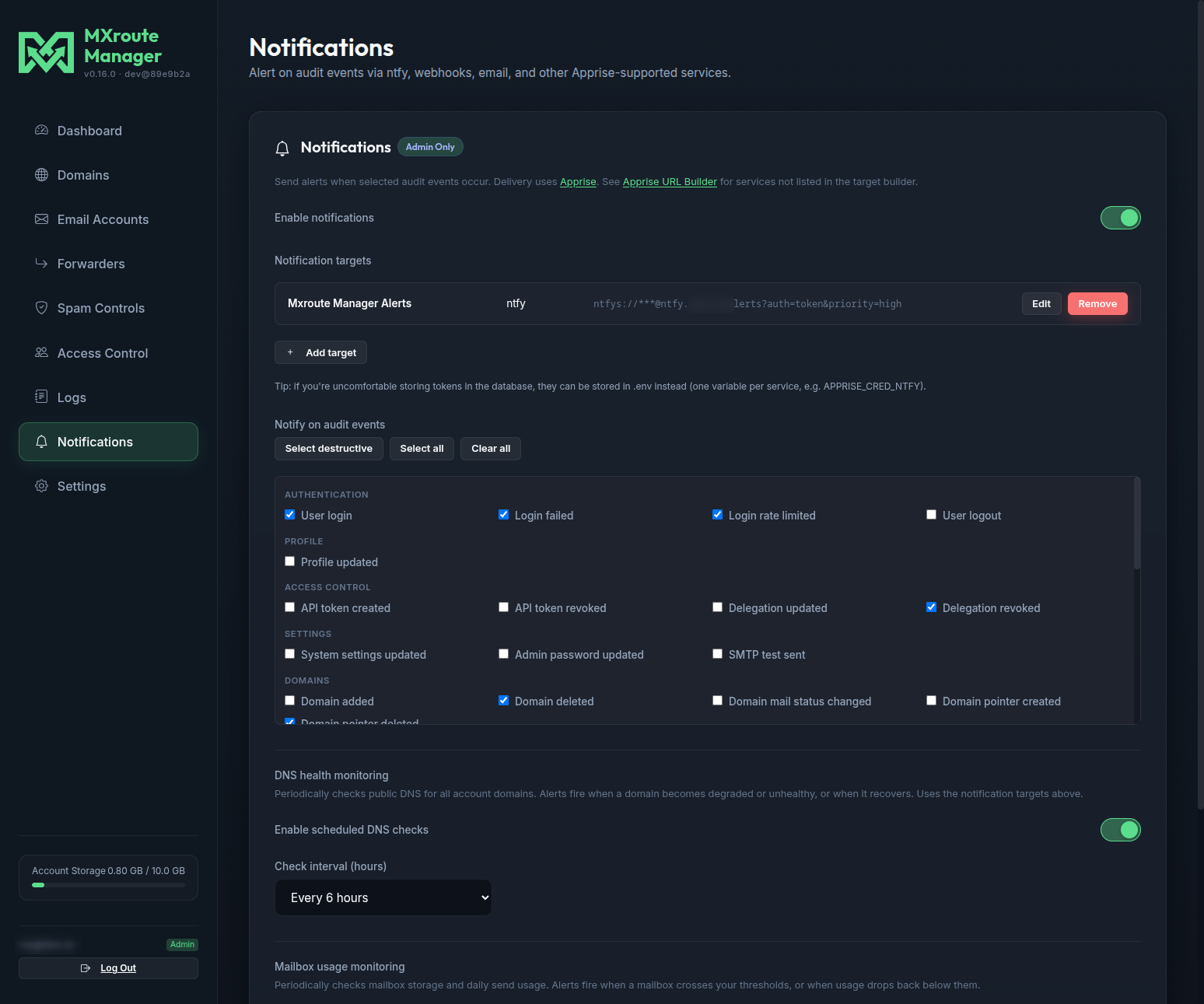
Quick start
- Sign in as an admin and open the Notifications tab.
- Turn on Enable notifications.
- Click Add target, pick a service (e.g. ntfy), fill in the fields, and click Generate URL.
- Click Save to app, then Save Notifications.
- Under Notify on audit events, choose which actions should trigger alerts (or use Select destructive).
- Click Send Test Notification to verify delivery.
Notification targets
Each target is an Apprise URL plus a label. You can add multiple targets; all enabled targets receive every matching alert.
In-app builder
The Build tab walks through common services:
| Service | Typical use |
|---|---|
| ntfy | Self-hosted or ntfy.sh push alerts |
| JSON Webhook | Generic HTTP callback |
| Discord / Slack | Team chat webhooks |
| Gotify / Pushover / Telegram | Mobile or self-hosted push |
| Email (SMTP) | Email alerts |
| Custom Apprise URL | Any of Apprise’s 140+ services |
For services not in the list, use the Apprise URL Builder and paste the result on the Paste URL tab.
Email and Mailbox Password Reset SMTP
When adding an Email (SMTP) target, enable Use Mailbox Password Reset SMTP settings to reuse the SMTP host, user, and password already configured under Settings → Mailbox Password Reset (RESET_SMTP_* in .env). You only need to set the To address (and optional From override).
Storing credentials
By default, tokens are saved in the SQLite database as part of the Apprise URL (same approach as Uptime Kuma and similar tools). For ntfy and similar services, leaking a notification token is usually low risk (spam at worst), not comparable to a reused login password.
If you prefer not to store tokens in the database:
- After Generate URL, check Store token in .env instead of the database.
- Click Copy token for .env and add the line to
.env. - Save to app - the database keeps the URL without the secret; the token is read from
.envat send time. - Restart the app after editing
.env.
Per-service environment variables
Use one variable per service for the token only (not the full Apprise URL):
| Variable | Service |
|---|---|
APPRISE_CRED_NTFY |
ntfy auth token |
APPRISE_CRED_JSON |
JSON webhook bearer token |
APPRISE_CRED_DISCORD |
Discord webhook token |
APPRISE_CRED_GOTIFY |
Gotify application token |
APPRISE_CRED_PUSHOVER |
Pushover API token |
APPRISE_CRED_TELEGRAM |
Telegram bot token |
APPRISE_CRED_SMTP |
SMTP password (email targets not using reset SMTP) |
Email targets that use Mailbox Password Reset SMTP read the password from RESET_SMTP_PASSWORD (already env-only).
Example .env fragment:
APPRISE_CRED_NTFY=tk_your_ntfy_token_here
The UI stores the non-secret parts of the URL (server, topic, priority, etc.) in the database and injects the token from .env when sending.
Notification icon
Push notifications use the MXroute Manager logo instead of the default Apprise icon when a public avatar URL can be resolved.
The app ships static/notification-logo.png and, at send time, injects avatar_url into supported Apprise URLs (ntfy, Discord, Slack, Mattermost, and similar). Apprise's asset bundle is also pointed at the same image for broader plugin support.
Configure the public URL in .env:
| Variable | Purpose |
|---|---|
MANAGER_PUBLIC_URL |
Public origin of this install (e.g. https://manager.example.com). Avatar defaults to {MANAGER_PUBLIC_URL}/static/notification-logo.png. |
NOTIFICATION_AVATAR_URL |
Optional full URL override if the logo is hosted elsewhere. |
RESET_PORTAL_CNAME_TARGET |
Fallback hostname when MANAGER_PUBLIC_URL is unset (combined with PUBLIC_URL_SCHEME). |
ntfy must be able to fetch the PNG over HTTPS from the internet. If icons still show the Apprise logo, confirm the URL opens in a browser and set NOTIFICATION_AVATAR_URL explicitly.
Audit events
Subscriptions are explicit: only checked events trigger notifications. The list mirrors actions shown in Logs. Common choices:
- Destructive preset: deletes, revokes, teardowns
- settings.admin_password_update: local admin password changes
- domain.create / mailbox.create: provisioning events
Test notifications use the notification.test action and do not re-trigger themselves.
DNS health monitoring
Optional background checks compare each account domain's public DNS health (same checklist as the Domains tab) on a schedule. When a domain transitions to degraded/unhealthy, or recovers to healthy, the app can emit audit events and Apprise notifications.
What each check means (SPF superset rules, per-domain DMARC, healthy vs degraded): DNS health checks.
Configure under Notifications:
| Setting | Purpose |
|---|---|
| Enable DNS health monitoring | Turn the background loop on or off |
| Check interval (hours) | How often to scan all domains (bounded in the UI) |
Subscribe to these audit actions if you want alerts:
| Action | When it fires |
|---|---|
dns.health_alert |
Domain overall status became degraded or unhealthy |
dns.health_recovered |
Domain returned to healthy after a bad state |
The monitor runs inside the app process (daemon thread). It respects Cloudflare/MXroute configuration the same way manual rechecks do. State is stored in SQLite so you only get alerts on transitions, not on every poll.
For automation that fixes DNS without waiting for email, admins can use Fix unhealthy DNS on the Domains tab or POST /api/cloudflare/dns/fix-bulk - see HTTP API.
Mailbox usage monitoring
Optional background checks scan every mailbox on the account for storage and daily send usage. When a mailbox crosses your thresholds (default 90%), or drops back below them after cooling off, the app emits audit events and Apprise notifications.
Configure under Notifications:
| Setting | Purpose |
|---|---|
| Enable scheduled mailbox usage checks | Turn the background loop on or off |
| Check interval (hours) | How often to scan (bounded in the UI) |
| Storage alert at (%) | Quota usage threshold (skipped for unlimited quota) |
| Daily send alert at (%) | Outbound send threshold |
Subscribe to these audit actions if you want alerts:
| Action | When it fires |
|---|---|
mailbox.quota_alert |
Storage usage crossed the threshold |
mailbox.quota_recovered |
Storage usage dropped below threshold again |
mailbox.send_limit_alert |
Daily send usage crossed the threshold |
mailbox.send_limit_recovered |
Daily send usage dropped below threshold again |
The monitor shares the same background thread tick as DNS health monitoring. State is stored in SQLite so you only get alerts on transitions.
See also Bulk mailbox CSV for import/export workflows.
Troubleshooting
| Issue | Check |
|---|---|
| No alerts | Notifications enabled? At least one target? Event subscribed? |
| Test fails | Target URL valid? ntfy token correct? HTTPS (ntfys://) for self-hosted? |
| Env token ignored | Variable name matches target (APPRISE_CRED_NTFY)? App restarted after .env edit? |
| Email fails | SMTP settings or RESET_SMTP_PASSWORD set? Recipient address correct? |
Related guides
| Guide | Topic |
|---|---|
| HTTP API | Bulk DNS fix endpoint |
| Configuration | Environment variable reference |
| Mailbox password reset | Shared SMTP for email notifications |